


IRS2Go
4.019.58K Reviews
App Specs
- Version
- 6.3.5
- Updated On
- License
- Free
- Downloads
- 10,000,000+
- Developer
- Internal Revenue Service
- Categories
- Finance
- Platform
- Android, iOS
Screenshots


 Analysis by AppCompare
In a household where more than one person handles tax paperwork, the practical question is often not just how to check a refund, but how to keep each person’s information separate. I see IRS2Go as a useful companion for quick, individual tasks rather than a shared family tax account. It can make routine contact with the IRS less cumbersome, but it works best when each user keeps their own details and decisions firmly under their control.
One phone, separate tax situations
A shared device can be convenient when someone is helping a partner or relative navigate a tax task. The important boundary is that a refund lookup or payment relates to a particular taxpayer, not to the household as a whole. Before entering sensitive details, I would make sure the person whose return is involved is present and understands what is being checked or paid.
That distinction matters in everyday use. A spouse might help find the refund-status screen, while the taxpayer supplies the information and reviews the result. An adult child might help a parent locate a nearby tax-assistance service without taking over the parent’s financial decisions. The app is useful in these moments because it puts several IRS-related tasks in one place, but it should not be treated as a shared account with one household-wide view.
Set boundaries before entering personal details
When several people use the same phone, I would avoid leaving tax information visible after a task is finished. Close the relevant screen, return the device to its usual lock state, and do not pass around a phone that is still open to a personal tax task. These are simple habits, but they help keep one person’s refund or payment details from becoming casual household information.
The refund-status workflow asks for identifying information alongside filing details and the refund amount. That makes it especially important to have the right person enter the information and to double-check that the return being discussed is theirs. If you are assisting someone else, guide them through the steps rather than guessing at answers or keeping their details for convenience.
A shared phone is also not the best choice if another person can unlock it or routinely checks its notifications. I would use a personal device for sensitive tasks whenever possible. If that is not practical, treat the app as a short, supervised visit: complete the task together, review the result, then hand the phone back in a locked state.
Coordinate the task, not the account
IRS2Go can help household members coordinate around a tax task without replacing a conversation about who is responsible for it. For instance, one person can look up a local VITA or TCE option while the taxpayer checks whether the location suits their needs. Another can remind a family member to check a refund, but the person named on the return should make the lookup and interpret the result.
Worth Reading Before You Choose

EA SPORTS FC Mobile 26 Is a Bigger Football Game, but It Takes Time

Flipboard Shows What News Apps Must Do Beyond the Feed

Switching to Android Auto Means Rethinking Your Driving Routine

Google Calendar Makes a Crowded Week Easier to Manage

Ludo King Makes the Most of the Minutes Between Plans

Baby Panda World Brings Quick Play to Modern Phones, but Its Game Library Feels Busy
For payments, I would be even more deliberate. The person responsible should review the amount, payment method, and purpose before submitting anything. If a couple divides household finances, agreeing who will handle the task beforehand avoids duplicate effort and makes it clearer who has actually completed the payment. The app can make the action more convenient; it cannot decide which family member should authorize it.
It is also worth separating a quick status check from tax planning. A refund update can answer a narrow question, but it does not explain every detail of a return or resolve a disagreement about how something was filed. When a household needs to make a decision that affects multiple people, I would use the app for the specific IRS task and discuss the broader issue separately.
Age, confidence, and trust
The app is rated for Everyone, which makes its age classification broad, but tax tasks still call for adult judgment and care with personal information. I would not treat a general content rating as a reason to let a child handle a parent’s tax details. A younger family member can help with basic phone navigation if asked, while the taxpayer remains in charge of what gets entered and what action is taken.
For an older relative, the most helpful role may be sitting together and reading the screens aloud, not taking over the device or keeping a record of their information. The app’s straightforward layout can make that kind of assistance less intimidating, especially for someone who only needs to check a refund or look for free local help. If the person finds phone-based tasks stressful, a website, a phone call, or in-person assistance may feel more comfortable.
Trust also means being clear about the limits of what the app does. It can support selected IRS tasks, but it is not a substitute for preparing a return or for individualized tax advice. I would not use a refund result as a complete explanation of a tax situation, and I would direct complicated questions to an appropriate tax professional or assistance program.
Everyday IRS2Go use and what to expect
I find it helpful to decide what I need from IRS2Go before opening it: a status check, a payment, or a search for local help each calls for a different kind of attention. That small pause is especially useful on a shared phone, where it keeps a quick task from turning into casual browsing through someone else’s tax information. From there, the key is knowing which details belong to the taxpayer and which decisions should stay theirs.
A practical moment during tax season
Picture a household waiting for a refund while managing ordinary expenses. One person has filed the return, another is trying to plan a bill, and both are tempted to check repeatedly. The app makes the status check easy to reach, but a more useful routine is to check when there is a reason to do so, remember that the information updates once a day, and avoid treating an unchanged result as a sign that something has gone wrong.
That once-a-day rhythm is a small but useful detail: checking several times in a short span is unlikely to provide a fresh update. I would use the waiting time to keep the household’s own records organized, rather than repeatedly reopening the status screen. If the result raises a question, the app’s status information is a starting point, not a personal explanation of the return.
The same practical approach applies to finding free tax help. Searching with a ZIP code can narrow the options, but I would still check whether a listed program fits the taxpayer’s circumstances and make contact before travelling. A nearby result is a lead, not a guarantee that a particular service can handle every tax issue or is immediately available.
Where this app fits among tax tools
In the finance-app landscape, IRS2Go has a narrower job than tax-preparation software. Tax software is designed to guide people through preparing and filing a return; this app is better understood as a way to reach selected IRS services after or around that work. If your main goal is to calculate deductions, compare filing approaches, or prepare a complicated return, a dedicated tax-preparation service or a qualified tax professional is the more suitable tool.
Compared with searching the IRS website in a mobile browser, an app can be a convenient shortcut when you already know which task you need. The trade-off is that an app’s focused menu does not turn it into a full tax reference library. When a question is broad or unusual, I would look for the relevant official guidance or ask for professional help rather than assume the app’s available actions cover the issue.
IRS2Go is free, and the Internal Revenue Service is its developer. It has a four-point-zero average from around seventy-four thousand ratings, with about nineteen thousand written reviews and over ten million installs. Those figures suggest that it is widely used, but they do not tell me whether it will suit a person who needs extensive tax guidance; the best fit still depends on the task.
Small workflow choices that make it more useful
I would start by deciding what the app is being used for before opening it. A refund check, a payment, a search for local assistance, and a request for tax tips are different tasks, so having the relevant return details or question ready can make a short visit less frustrating. For a payment, pause to verify the amount and purpose; convenience is not a reason to rush a financial action.
For people who file through another service, it can help to keep the roles distinct: use the preparation service for preparing the return and IRS2Go for the specific IRS-related task at hand. That separation reduces the chance of expecting one app to explain information that belongs in another. It also helps a household member offering support stay within a clear role instead of mixing up filing records with IRS account actions.
The tax-tip option is most useful when treated as general reading rather than tailored advice. I would use it to keep an eye on topics that may matter to me, then check the official details that apply to my situation before making a decision. A tip can point toward a question worth asking; it should not replace a careful review of the taxpayer’s circumstances.
Who should choose it, and who may prefer another route
I would recommend IRS2Go to someone who wants a direct way to check a refund, make an eligible payment, locate free tax help, or receive IRS tax tips. It is especially handy for people who already know what they need and want a compact route to that task. Its focused design is a strength when the goal is simple, not a sign that it handles every part of tax season.
I would steer someone toward a different option if they need step-by-step return preparation, detailed explanations of complex tax questions, or a shared household dashboard. It is also not my first choice for a person who does not feel comfortable entering personal information on a phone. In those cases, a tax-preparation service, direct IRS resources, a tax professional, or in-person assistance may be a better fit.
The app is free and has an Everyone content rating. It was released on January 18, 2011, and its current version is 5.6.10, with Android 7.0 as the stated minimum operating-system requirement. I would still check that the app is compatible with the device in use and keep the operating system and device security settings up to date, particularly when handling financial tasks.
Getting Started with IRS2Go
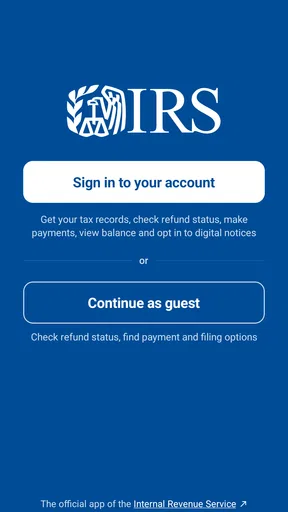
First things first, downloading IRS2Go is a breeze. It’s available on both Android and iOS, and it’s free! Once you’ve got it on your device, you’ll see a pretty straightforward interface. No flashy animations or unnecessary clutter, which is kinda refreshing when you’re dealing with something as serious as taxes.
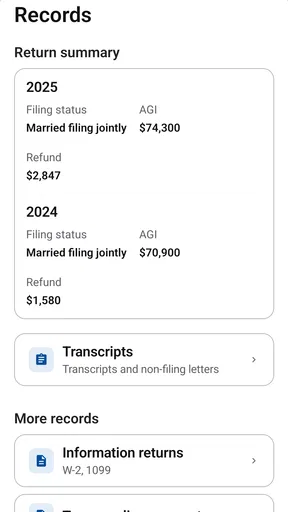
The app is surprisingly intuitive. Even if you’re not a tech wizard, you’ll find it easy to navigate. The main menu gives you a few options: check your refund status, make a payment, find free tax help, and sign up for IRS tax tips. Pretty much everything you need to manage your taxes is right there at your fingertips.
Checking Your Refund Status
This feature is probably the star of the show. Who doesn’t want to know when they’re getting their money back, right? Just tap on the "Refund Status" option, and you’ll be prompted to enter your Social Security number, filing status, and the exact amount of your refund. A few taps later, you’ll know if your refund is on its way or if you should start asking questions.
It’s worth noting that the information is updated every 24 hours, so you’re always getting the latest info. Honestly, it’s a lot better than constantly calling or checking the IRS website. Plus, you can check your refund status anytime, anywhere. How cool is that?
Making Payments
Now, onto the less exciting part—making payments. If you owe Uncle Sam some cash, you can take care of that right in the app. The "Make a Payment" feature connects you to IRS Direct Pay, where you can pay directly from your bank account. It’s quick, secure, and you don’t have to deal with mailing checks or worrying about postage.
Plus, you can save your payment information for future use. Not that anyone wants to make this a regular thing, but if you need to, it’s handy.
Finding Free Tax Help
Taxes can be a maze, and sometimes you need a little expert guidance. Luckily, the app has a "Free Tax Help" section. With a few taps, you can locate Volunteer Income Tax Assistance (VITA) and Tax Counseling for the Elderly (TCE) programs near you. These programs offer free tax help to people who qualify, which is a massive relief for those who need a bit of a helping hand.
Just enter your zip code, and you’ll get a list of nearby places offering assistance. It’s a great way to make sure you’re getting all the credits and deductions you’re eligible for without paying a dime for advice.
Getting IRS Tax Tips
If you’re the kind of person who likes to stay ahead of the game, you’ll appreciate the "IRS Tax Tips" feature. You can sign up to receive tax tips directly to your inbox. These tips are a goldmine of information, covering a wide range of topics that can help you save money and avoid common tax pitfalls.
It’s like having a personal tax advisor who’s always looking out for you. Well, almost.
Security and Privacy
One thing you might be worried about with an app like this is security. Rest assured, the IRS has implemented solid security measures to protect your information. The app doesn’t store your Social Security number or any personal data, and all communications are encrypted. So, you can use the app without worrying about your info falling into the wrong hands.
Of course, it’s always a good idea to keep your phone secure with a password or biometric lock, just to be on the safe side.
Final Thoughts
Overall, IRS2Go is a nifty little app that makes dealing with taxes a tad less stressful. It’s not going to do your taxes for you, but it sure does help in keeping track of things. Whether you’re checking on your refund, making a payment, or finding tax help, the app has you covered.
If you haven’t already, give it a whirl next tax season. It might just save you a few headaches—and who doesn’t want that?
Pros
- Simple and intuitive interface.
- Secure login with multi-factor authentication.
- Quick access to IRS tools and services.
- E-file status tracking is fast and reliable.
- Free tax payment options are convenient.
Cons
- Limited functionality for non-U.S. users.
- Occasional login issues reported.
- Some features require internet access.
- No support for complex tax scenarios.
- Lacks detailed guides for beginners.
FAQs for IRS2Go
What is IRS2Go and what can I do with it?
IRS2Go is the official mobile app of the Internal Revenue Service, designed to provide a convenient way for taxpayers to interact with the IRS. Users can check their refund status, make a payment, and get tax updates. The app also allows you to access free tax help and get tips to ensure your tax filing is efficient and accurate.
Is IRS2Go safe and secure to use for my tax information?
Yes, IRS2Go is designed with security in mind, employing robust encryption and other protective measures to ensure your personal and financial information is safeguarded. The IRS prioritizes user security and privacy, ensuring that your data is handled with the highest standards of confidentiality.
Can I use IRS2Go to file my taxes directly?
No, IRS2Go does not allow users to file taxes directly through the app. However, it provides various tools and resources to assist with your tax filing process, such as checking refund status and accessing free tax preparation services. For filing, you’ll need to use a separate service or visit the IRS website.
Does IRS2Go support multiple languages?
Yes, IRS2Go is available in both English and Spanish. This multilingual support ensures that a broader audience can access and utilize the app’s features effectively, making it easier for non-English speakers to get valuable tax information and assistance.
Is IRS2Go compatible with all mobile devices and platforms?
IRS2Go is available for both Android and iOS devices. It supports most smartphones and tablets, ensuring a wide range of compatibility. Users can download the app from the Google Play Store or Apple App Store to benefit from its features, regardless of their preferred mobile platform.


